


Manual translation and technical document translation can be word-perfect, and the manual can still be unshippable. Wrong language settings, wrong line breaking, a font without glyph coverage, recto and verso pages that no longer align, table columns running the wrong direction, a leader line landing on top of the artwork: any one of these stops the release. Multilingual DTP gets treated as the cleanup pass after translation. It is a discipline of its own.
The risk concentrates in three places. Languages that expand, such as German, Russian, and Finnish. Languages that read right to left, such as Arabic and Hebrew. Languages where line-break prohibition rules and leading standards govern the page, such as Chinese, Japanese, and Korean. In all three, one DTP defect becomes a re-layout and a reprint.
What is a DTP and layout integrity check?
A DTP and layout integrity check verifies that a translated manual renders correctly in the actual deliverable before it ships. It confirms that page flow, text handling, typography, visual elements, and multilingual behavior such as RTL mirroring and CJK line-break rules are applied consistently across every language, judged against the final PDF or HTML rather than the editing screen. It is a different gate from the translation integrity check, which judges the translated file itself.

The same sentence can grow or shrink by 30 to 40 percent depending on the language. German overruns the text box. Arabic requires the table columns to mirror. Khmer, Vietnamese, and Hindi shift their combining marks and tone marks depending on the font and the software settings. A layout that is finished in the source language is not finished in the target languages.
- Who this is for Technical writers, manual owners, localization and DTP staff, quality reviewers, and manufacturers producing multilingual deliverables with automated or AI-assisted layout tools.
- When to use it During multilingual DTP or immediately after it, right after the PDF or HTML build, and at layout sign-off before delivery.
- Use with The companion DTP and Layout Integrity Checklist, which turns these 20 checks into a sign-off form.
This guide covers general checks that apply across industries and product types. Product-specific regulatory marking, customer brand standards, and language-level typesetting rules require separate review. It does not replace a standard, a regulation, or a customer style guide.
1. Why multilingual DTP is its own discipline
Translation carries meaning from one language into another. Multilingual DTP turns that text into the document a user actually reads. This stage has to control text length per language, writing system, font, leading, tracking, line breaking, table direction, and the relationship between artwork and the text around it.
A DTP check therefore reaches past visual review. It confirms that page structure, text handling, typography, visual elements, and multilingual behavior hold consistently across the entire deliverable set. That makes it a pre-release QA gate.
2. The five areas multilingual DTP has to control
| Area | What DTP has to verify |
|---|---|
| Page flow and structure | Hold recto and verso hierarchy, running heads and feet, and generated TOC accuracy regardless of how much the text grows or shrinks per language. |
| Text handling | Control text box overflow, line-break prohibition, abbreviation and unit splitting, and orphans and widows according to each language’s rules. |
| Fonts and typography | Verify font embedding and licensing, ligature and combining-mark rendering, and per-language leading and tracking for legibility. |
| Visual elements | Confirm automatic caption numbering, leader lines and callouts, and table and chart cell sizing and legends against the deliverable. |
| Multilingual behavior | Mirror RTL layouts, apply CJK line-break prohibition, and switch font and direction correctly wherever scripts are mixed. |
3. The five categories of the 20 checks
These checks are industry-neutral by design. They apply equally to consumer electronics, automotive, industrial and construction equipment, medical devices, and robotics, because every one of these programs ships technical content in multiple languages. They are drawn from Hansem Global’s internal multilingual DTP quality standards, narrowed to the general items any manufacturer documentation team can run.
| Category | What it verifies at the layout stage | Checks |
|---|---|---|
| A. Page flow and structure | Recto and verso, chapter starts, generated TOC, page pairing, master pages | 5 |
| B. Text handling | Text box overflow, line breaking, abbreviation splitting, alignment, orphans and widows | 5 |
| C. Fonts and typography | Font selection and embedding, licensing, legibility, ligatures and combining marks | 4 |
| D. Visual elements | Caption numbering, leader lines, table and chart cells | 3 |
| E. Multilingual behavior | RTL mirroring, CJK line-break prohibition, mixed-script runs | 3 |
Severity distribution: Critical (A) 10 · Major (B) 10 · Minor (C) 0
4. Severity grades and the sign-off rule
The 20 checks do not carry equal weight. Grade them by what they cost downstream, then enforce one rule: Grade A must be at zero before the deliverable ships.
| Grade | Name | Definition and consequence if missed |
|---|---|---|
| A | Critical / mandatory | A single miss can trigger a launch delay, a full re-layout, a complete reprint, or a legal dispute. Must be zero at sign-off. |
| B | Major / recommended | A miss leads to customer claims, rework, and erosion of brand trust. Target zero wherever possible. |
| C | Minor / supporting | Low impact individually. Accumulated across languages and releases, these drive quality variance and operating cost. |
5. The 20 checks in detail
The table below expands each checklist line into working guidance. In production, record every item twice: once by the DTP operator (Self), once by an independent reviewer (Reviewer).
| No | Check and acceptance criterion | Grade |
|---|---|---|
| 1 | A. Page flow and structure Are running heads, running feet, language bars, and page numbers positioned consistently across languages? Check position, size, and alignment per language, plus the blank-page policy. | A |
| 2 | A. Page flow and structure Do chapters and sections start on the same side (recto or verso) in every language? Confirm the recto-start or new-page-start rule holds across all languages. | B |
| 3 | A. Page flow and structure Have the generated TOC and index been rebuilt in every language, with page numbers that match? Translation length shifts page numbers. Rebuild, then verify the TOC against the body text. | A |
| 4 | A. Page flow and structure Does recto and verso pairing hold per language in the bound version? Confirm that left-page and right-page positions stay identical across languages. | A |
| 5 | A. Page flow and structure Have master page changes been synchronized to every language deliverable? Confirm master page and running-head variable changes propagated to all language files at once. | B |
| 6 | B. Text handling Is there any text box overflow caused by language expansion? Check every expanding language (German, Russian, Finnish) in full, not by sampling. Zero clipped characters, zero overflow. | A |
| 7 | B. Text handling Are hyphenation and line-breaking rules applied per language? Confirm hyphenation is turned off for languages that do not hyphenate (Chinese, Japanese, Korean, Thai, Arabic). | A |
| 8 | B. Text handling Are abbreviations, units, and figures protected from splitting at line end? Apply non-breaking spaces so that “64 GB” and “Fig. 3” cannot split across a line break. | B |
| 9 | B. Text handling Is paragraph alignment (left, right, justified, centered) consistent per language? For Arabic and Hebrew, confirm word spacing adjusts correctly under justification. | B |
| 10 | B. Text handling Are orphan and widow controls enabled? Confirm the option preventing a single stranded word or line at a paragraph boundary is active. | B |
| 11 | C. Fonts and typography Is an appropriate font selected and embedded for each language? Verify Unicode block coverage, set PDF font embedding ON, and confirm zero corrupted glyphs. | A |
| 12 | C. Fonts and typography Does the font license cover the full multilingual distribution scope? Confirm the commercial font’s embedding, web, and print rights are sufficient for global distribution. | A |
| 13 | C. Fonts and typography Do font size, tracking, and leading meet per-language legibility standards? Apply the recommended leading for Chinese, Japanese, and Korean. Flag any body text below the 6 pt legibility floor. | B |
| 14 | C. Fonts and typography Do ligatures and combining characters render correctly? Inspect Arabic contextual forms, Devanagari conjuncts, and Vietnamese stacked diacritics. | A |
| 15 | D. Visual elements Do captions and numbering (Figure N, Table N) match the in-text references automatically? Apply automatic captioning and cross-references, then verify against the body text. | A |
| 16 | D. Visual elements Do leader lines and callouts avoid colliding with the translated text? Visually inspect whether expanded text pushes a leader line onto the artwork or clips it. | B |
| 17 | D. Visual elements Have table and chart cell widths and wrapping been adjusted for language expansion? Check for overflow inside cells, clipped header cells, and truncated chart legends. | B |
| 18 | E. Multilingual behavior Is the layout mirrored for RTL languages such as Arabic and Hebrew? Confirm page flow, running heads and feet, and table column order start from the right. Numerals and Latin characters stay LTR. | A |
| 19 | E. Multilingual behavior Is CJK line-break prohibition (kinsoku) applied? Confirm the rules preventing prohibited characters at line start or line end are active. | B |
| 20 | E. Multilingual behavior Do font and direction switch correctly in mixed-script runs? Check English model numbers inside Arabic body text, English abbreviations inside Japanese body text, and similar cases. | B |
6. Four layout defects found most often just before delivery
All four look correct in the source-language file and only surface in the target-language deliverable. Automated layout tools do not remove the need to confirm against the final PDF.
- Text overruns the box and the last line disappears If it ships Safety or operating information goes missing. The page has to be re-laid out, and often every language has to be rechecked.
How to block it Check the text boxes of every expanding language (German, Russian, Finnish) in full. - Page count grows and recto/verso pairing breaks If it ships In the bound print version, odd and even page hierarchy no longer lines up, which forces a re-layout and a reprint.
How to block it Reconcile the final page count per language against the chapter-start rule (recto or verso). - Missing font embedding corrupts glyphs in the PDF If it ships Every deliverable has to be regenerated, the customer rejects the review, and the launch slips.
How to block it Confirm PDF font embedding is ON and keep the preflight report as evidence. - Table columns stay left-to-right in the RTL edition If it ships Arabic and Hebrew readers scan the data columns in reverse and misread the values.
How to block it Confirm table columns, running heads, and running feet start from the right, and keep numerals and Latin characters LTR.
7. Error or correct: three worked examples
| Khmer tone marks | |
|---|---|
| ✗ Error | GREP styles or zero-width space settings are missing, so the upper tone mark lands in the wrong position.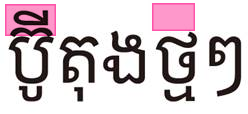 |
| ✓ Correct | Apply the language’s character-combining rules and the correct software settings so tone marks and combining characters render in position.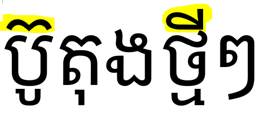 |
| RTL table direction | |
|---|---|
| ✗ Error | The Arabic and Hebrew table still runs left to right, so the reader scans the data columns in reverse.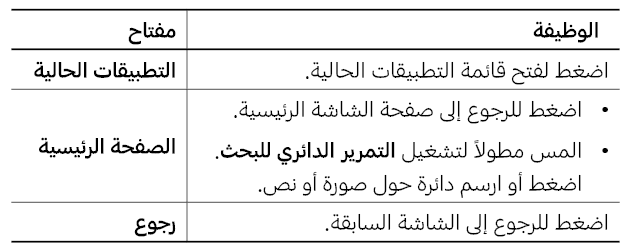 |
| ✓ Correct | Mirror page flow, table columns, running heads, and running feet to start from the right. Numerals and English model numbers stay LTR.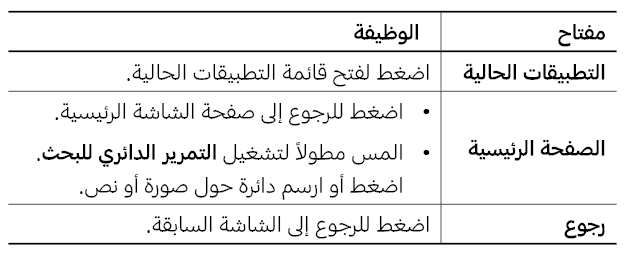 |
| German line breaking | |
|---|---|
| ✗ Error | The German language setting is missing, so long compound words break at the wrong position. |
| ✓ Correct | Apply German hyphenation and line-break rules, then check line-end splitting, box overflow, and orphans together. |
8. Running it as a two-stage cross-check
Most DTP defects are only visible in the final PDF. A single visual pass is not enough. Split the work into a self-check immediately after layout and an independent cross-check before delivery.
| Stage | Who performs it | What they do | Sign-off criterion |
|---|---|---|---|
| Stage 1: operator self-check | The DTP operator or layout owner | Walk all 20 checks straight after layout and clear the Grade A defects first. | Grade A at zero. Grade B findings logged with impact and a fix plan. |
| Stage 2: independent cross-check | A reviewer or QA lead who did not do the layout | Re-verify page flow, box overflow, glyph corruption, and RTL and CJK behavior against the actual PDF or HTML. | Approve for release, or reject. A rejected file is corrected and re-verified. |
If you use automated or AI-assisted layout tools
Automation applies repeatable settings quickly, and that is worth having. Judgments about consistency across language deliverables, legibility, table direction, and leader-line collisions still require a person looking at the output. Hansem Global runs this division of labor through TransEZ, its multichannel publishing engine, the automated checks in its QA Suite, and a cross-check by language-specific DTP reviewers.
9. How a manufacturer documentation team can adopt this
- Before layout starts, lock the font set per language, the license scope, the leading and tracking standards, and the list of expanding languages.
- Once the source layout is final, typeset an expanding language (German or Russian) next, so the box tolerances are proven before the rest follow.
- Give RTL and CJK languages their own master pages and typesetting rules. Do not clone the source layout and translate into it.
- Generate the final PDF, then run the 20 checks. Judge against the deliverable, not the editing screen.
- Drive Grade A items to zero before release. Anything you cannot close gets an exception reason and a named owner.
- Keep the completed checklist and the preflight report. They become the evidence trail for the accessibility, print, and data management stages later in the series.
Frequently asked questions
- If translation review is done, can we go light on the DTP review? The two reviews judge different things. Translation review confirms the meaning and integrity of the text. DTP review confirms that the text renders correctly in the actual deliverable. A file that passed translation integrity will still produce box overflow, TOC page-number mismatches, corrupted glyphs, and reversed RTL tables.
- If we have automated or AI layout tools, do we still need this check? Yes. Automation applies repeatable settings quickly. It does not guarantee per-language line breaking, leader-line collisions, table direction, font licensing, or the rendering quality of the final PDF.
- How much does text actually expand? Against English, German typically runs around 30 percent longer, with Russian and Finnish in a similar range. Chinese and Japanese contract instead. Expansion is steepest on short strings, which is why buttons, labels, and callout text overflow first.
- How far does RTL mirroring go? Do numerals and English model numbers mirror too? Page flow, running heads and feet, table column order, and leader-line direction all mirror to start from the right. Numerals, Latin characters, and English model numbers stay LTR. Mirroring both together produces model numbers printed backwards, which is a common and costly error.
- Is font licensing just a design team question? A multilingual manual can involve PDF embedding, web publishing, print distribution, and global redistribution. Whether the commercial font’s rights cover all of those paths needs to be confirmed jointly by DTP, localization, and document management.
Pre-Launch QA Series for Multilingual Manuals (8 parts)
The series follows a multilingual manual from translation intake to market release, one gate at a time. Each part pairs a guide with a self-check checklist.
- Part 1 · Translation integrity Catching defects in translated files before editing
- Part 2 · DTP Multilingual typesetting and layout integrity (this guide)
- Part 3 · Regulatory Market-specific regulatory and standards marking
- Part 4 · UI matching Synchronizing product screens with the document
- Part 5 · Accessibility EAA, WCAG, PDF/UA, and Section 508 conformance
- Part 6 · Multi-channel output Consistency across PDF, HTML, and mobile
- Part 7 · Print Bleed, CMYK, font embedding, and print readiness
- Part 8 · Data management Turning source files and TM into reusable assets