


AI subtitle translation tools have dramatically shortened the turnaround time needed to generate a first draft. Speech recognition, segmentation, and translation can now be completed in minutes. But a fast draft does not necessarily mean faster delivery. The time and effort required to turn that draft into publish-ready subtitles determine the actual production schedule and cost.
The efforts of post-editing varies significantly by language pair. Hansem Global has tested commercial AI subtitle tools in real video localization projects. For English-to-Korean and English-to-Japanese work, we repeatedly found segmentation, line-break, and style issues regardless of the tool. The numbers of required revisions also greatly varied from video to video, making it difficult to estimate the completion time.
That experience led us to develop Hansem Subtitle Studio, our own proprietary solution for subtitling projects. It is an in-house production environment for Hansem Global’s video localization projects, not software offered for sale or as Software as a Service (SaaS). It is designed to reduce recurring post-editing work when translating English subtitles into Asian languages. This article explains the problems we commonly encounter in commercial-tool output and how Subtitle Studio helps address them.
For the basic subtitle translation workflow and quality criteria, see our related article, “Subtitle Translation: Why Accurate Translations Don’t Always Make Good Subtitles.”
Where Post-Editing Work Accumulates in Asian-Language Subtitles
English and many Asian languages differ in syntactic structure, writing systems, and sentence endings. The following are issues our team has repeatedly corrected in commercial-tool drafts. The examples are illustrative and focus on Korean and Japanese, the first languages optimized in Subtitle Studio.
1 Carrying English Subtitle Breaks into the Translation
English instructions often put the action before a condition, whereas Korean and Japanese commonly place the condition first and the action at the end. Translating one English cue at a time without reconsidering its boundaries can therefore show the action before the condition. In a procedural video, viewers may be prompted to press a button before they see how long they should hold it.
English source — Cue 1: Press and hold the power button
English source — Cue 2: until the indicator turns blue.
Commercial-tool Korean draft — Cue 1: “전원 버튼을 길게 누르세요” (action first)
Commercial-tool Korean draft — Cue 2: “표시등이 파란색으로 바뀔 때까지” (condition arrives later)
Post-edited Korean — merged cue: “표시등이 파란색으로 바뀔 때까지 전원 버튼을 길게 누르세요.” (condition first)
The editor merges the two cues and restores natural Korean word order. Reworking cue boundaries is common in language pairs with different sentence structures, yet tools that translate cues in isolation cannot reliably make that judgment.
2 Line Breaks in Japanese Text Without Spaces
Japanese does not normally separate words with spaces. A line break based on character count alone can split a word awkwardly. Japanese line-breaking rules (kinsoku shori) also prevent certain punctuation and small kana characters from appearing in inappropriate line positions.
Commercial-tool draft: ホーム画面からネットワー
ク設定メニューを選択します。
Post-edited: ホーム画面から
ネットワーク設定メニューを選択します。
Korean has related readability problems when a line separates a noun from its particle or splits a phrase unnaturally. Without language-specific line-breaking rules, human editors must correct these instances one by one.
3 Inconsistent Style Within the Same Video
Because translation engines may process subtitle cues individually, they can produce inconsistent levels of formality in one video. Korean instructions may alternate among polite commands, formal descriptions, and plain declarative forms, while Japanese subtitles may shift between desu/masu and da/de aru styles. Videos with multiple speakers also require consistent voice and tone for each speaker. Even subtle changes in style can undermine the overall professionalism of the video.
4 Terminology That Does Not Match with the Product UI or Manual
The same interface label may be translated differently across cues. For example, if “Settings” appears as two different Korean menu names (설정, 환경설정) viewers may be unsure which control to select. In product training and technical videos, subtitles should follow the terminology used in the actual interface and accompanying documentation.
5 Speech Speed Requirements That Vary by Language
Characters per second (CPS) and characters per line (CPL) are common subtitle readability measures, but appropriate limits differ by language and content. Korean, Japanese, and Chinese convey information differently from languages written in the Latin alphabet. When an AI draft does not apply the correct language-specific criteria, editors must manually identify and fix cues that exceed the limits.
How Subtitle Studio Supports the Editing Workflow
Subtitle Studio does not simply export AI-generated subtitles. Its purpose is to help editors locate recurring problems and correct them directly in a single production environment.
Review and Lock the Source-Language Subtitles First
The workflow starts by generating the source transcript, speech timing, and speaker information. An editor reviews and finalizes the source-language subtitles. Their timing becomes the shared reference for target languages, reducing the risk that speech-recognition errors will propagate across all translations.
Split and Merge Cues for Each Target Language
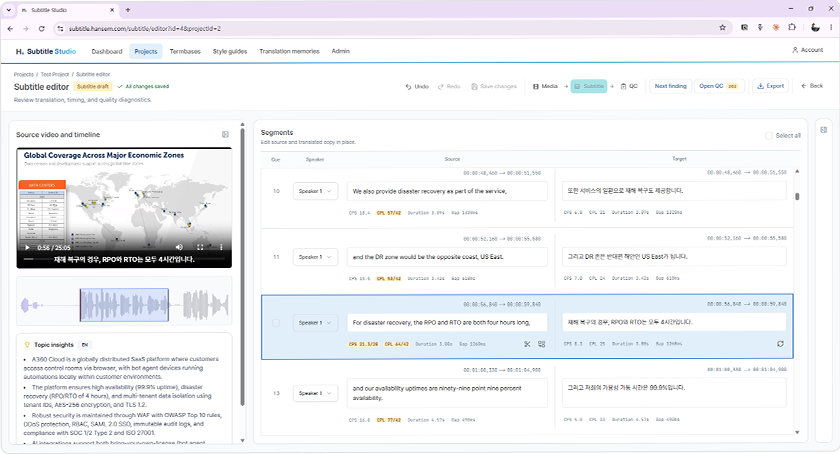
The editor displays source and target text side by side, with controls to split or merge cues and adjust start and end times. Individual segments can be retranslated without restarting the entire video, even when word-order differences require revised subtitle boundaries.
Identify Readability and QC Issues Immediately
Each cue displays CPS, CPL, and duration information. Editors can navigate quality-check results and focus on cues that exceed the relevant limits. Language-specific criteria support consistent review, including videos containing thousands of subtitle cues.
Keep Terminology and Style Guidance in the Workflow
Glossaries, style guides, and translation memories are managed within the environment. These resources help align subtitle terminology with product manuals and localized interfaces, while giving editors a consistent reference for style across the video.
Key Editing and Quality-Control Functions
| Workspace area | Information and controls available to editors |
|---|---|
| Video and timeline | Playback position, audio segments, and scene transitions |
| Side-by-side source and target panels | Speaker, text, start/end times, cue splitting and merging |
| Readability and QC diagnostics | CPS, CPL, display duration, and flagged cues |
| Production references | Glossaries, style guides, and translation memories |
Optimize Each Language with Specialist Review
AI subtitle output must be refined separately for each language. Segmentation, line breaks, writing style, and readability thresholds vary, and experienced local-language specialists are best placed to assess them. Our specialists test Subtitle Studio against real videos, report recurring corrections to the development team, and help refine its language-specific behavior.
The English-to-Korean and English-to-Japanese workflows have completed this optimization process and are in use on client projects. We are continuing the same process for Vietnamese, Thai, Chinese, and other languages. Our in-house Dubbing Studio is being expanded by language through a similar approach.
Evaluate AI Subtitle Tools by Post-Editing Effort
Draft-generation speed alone is not a sufficient measure of an AI subtitle tool. To understand its effect on production cost, compare tools using the same source video and target language, and measure:
- The percentage of subtitle cues requiring edits
- The number of cues whose boundaries must be adjusted
- The number of cues exceeding readability criteria
- Total editing and review time needed to reach delivery-ready quality
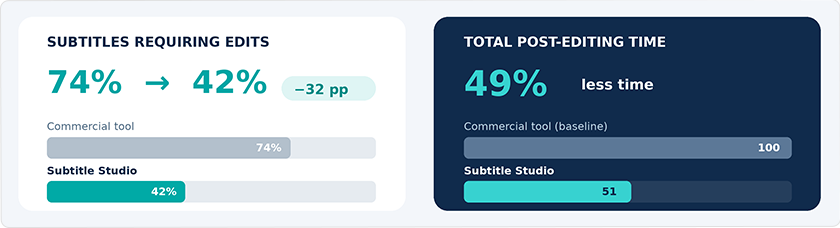
In our comparison of the same video processed with a commercial tool and Subtitle Studio, the share of cues requiring corrections fell by 32 percentage points, and total post-editing time declined by 49%. These results describe that comparison, not a guaranteed improvement for every language or video.
This is why we use Subtitle Studio for English-to-Korean and English-to-Japanese projects. Fewer corrections and more predictable editing effort help us manage schedules and quality across multiple languages.
What the Tool Does Not Replace
Subtitle Studio does not replace expert judgment. A reviewer still needs to watch the finished video to check whether subtitles obscure important on-screen elements or whether the sequence of instructions matches the action. Skilled editors also decide how to shorten text without changing its meaning or omitting safety-critical conditions. The tool reduces repetitive correction so professionals can concentrate on those decisions.
Similar challenges arise when speech is replaced through multilingual dubbing. We will introduce Hansem Global’s in-house Dubbing Studio in a subsequent article.
The Bottom Line
If you localize English-language videos for Asian markets, ask not only which AI tool is used, but also how long it takes to make its output delivery-ready. Hansem Global combines terminology management practices developed through technical documentation and software localization with our in-house Subtitle Studio to manage the quality and schedules of Asian-language subtitling projects.
If you are considering subtitle or dubbing localization for your videos, contact Hansem Global to discuss your language requirements and production workflow.