



Manufacturers develop training content for many purposes, from introducing new products and onboarding service technicians to explaining maintenance procedures and supporting employees across global locations.
Two widely used tools for creating this content are Articulate Rise 360 and Storyline 360. Both support online training development and delivery through learning management systems (LMSs), but they differ in how content is created and the types of learning experiences they can support.
For technical documentation and training teams, the question is not which tool is better overall. It is which tool best fits the training objective, the complexity of the content, and the needs of the people using it.
What’s the Difference Between Rise 360 and Storyline 360?
Rise 360 is designed for fast, straightforward course development.
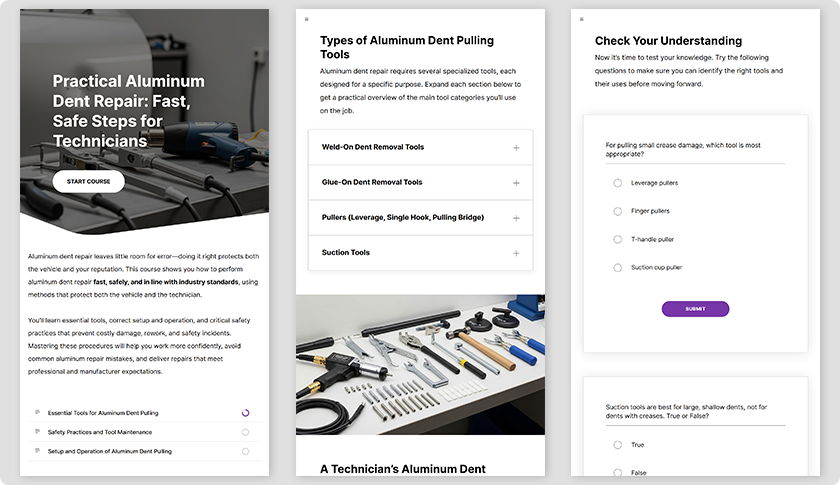
It uses a browser-based, block-oriented authoring environment. Content developers can assemble text, images, videos, quizzes, and interactive elements into structured learning modules without complex programming.
One of its main advantages is responsive design. Course layouts automatically adapt to different screen sizes, making Rise 360 particularly useful for employees learning on laptops, tablets, or smartphones.
For manufacturers, Rise 360 is well suited to product introductions, employee onboarding, standard operating procedures, safety awareness, and microlearning modules. It is especially useful when information needs to be delivered consistently and updated frequently.
Storyline 360 offers greater flexibility for interactive training and simulations.
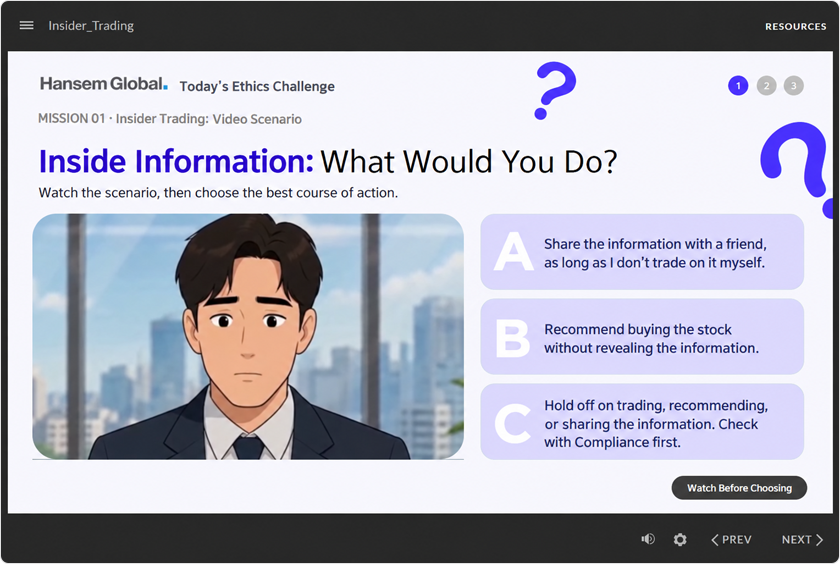
Storyline 360 uses a slide-based authoring environment with triggers, layers, and variables. These features allow developers to create learning experiences in which the content changes based on the learner’s choices and actions.
For example, a service technician might be presented with equipment fault symptoms and asked to select the appropriate diagnostic steps. A customer service representative might practice responding to different customer situations, with each decision leading to a different outcome.
This makes Storyline 360 particularly suitable for troubleshooting, software simulations, decision-based learning, and other situations where learners must practice applying their knowledge.
The key distinction is that Rise 360 emphasizes speed, consistency, and responsive course delivery, while Storyline 360 offers greater control over interactions and customized learning experiences.
Rise 360 vs. Storyline 360: Key Features Compared
| Feature | Rise 360 | Storyline 360 |
|---|---|---|
| Authoring approach | Browser-based block editor (Internet connection required for authoring) | Slide-based editor (Offline authoring available after initial sign-in) |
| Ease of development | Generally easier to learn | Requires more advanced authoring skills |
| Design flexibility | Primarily predefined content blocks | Extensive control over layouts and interactions |
| Interactivity | Built-in interactive blocks and scenarios | Custom branching, triggers, layers, and variables |
| Mobile compatibility | Responsive course layouts | Responsive player; slide layouts are not automatically reflowed |
| Development time | Generally faster | Depends on interaction complexity |
| LMS delivery | Supported (Learner progress tracking available) | Supported (Learner progress tracking available) |
| Multilingual localization | Supported; standardized blocks help maintain consistency | Supported; complex slide interactions may require additional checks |
| Localization layout work | Text, media, and block layouts require review | Text, media, slide layers, and interactive layouts may require adjustment |
| Localized QA focus | Language-specific assets, layout, and course navigation | Language-specific assets, animation timing, triggers, and interaction behavior |
One important difference is how each tool handles mobile learning.
Rise 360 automatically adjusts the content layout to the learner’s screen size. Storyline 360 provides a responsive player, but its slide content does not automatically reorganize in the same way.
For manufacturers whose field technicians or regional employees frequently access training on mobile devices, this distinction can influence the choice of authoring tool.
Choosing the Right Tool for Manufacturing Training
When Rise 360 Is a Better Fit
Rise 360 works well when the primary goal is to communicate information clearly, consistently, and efficiently.
Typical manufacturing applications include:
- New product introductions and feature training
- Employee onboarding and internal training
- Standard operating procedures and safety instructions
- Product updates and service bulletins adapted for training
- Short microlearning modules for distributed teams
For manufacturers managing multiple product models and frequent product updates, maintaining training content can become a significant workload.
Rise 360 is particularly useful when teams need to organize information into repeatable modules, make regular content revisions, and distribute training across different locations.
Its responsive design also makes it a practical choice for organizations with technicians, sales representatives, and other employees who learn on mobile devices.
When Storyline 360 Is a Better Fit
Storyline 360 is more appropriate when training requires learners to make decisions, perform tasks, or practice responding to realistic situations.
Typical manufacturing applications include:
- Equipment troubleshooting and fault diagnosis
- Maintenance and repair procedure simulations
- Software interface and control system training
- Safety-related decision-making scenarios
- Customer service and technical support simulations
Consider a technician learning how to diagnose a machine that fails to start. Rather than simply reading a troubleshooting procedure, the technician can examine symptoms, select inspection steps, and receive feedback based on those choices.
Storyline 360 can turn this type of information into an interactive learning experience.
However, sophisticated interactions require additional instructional design, development, and testing. This typically increases production time compared with simpler Rise 360 courses.
Can Rise 360 and Storyline 360 Be Used Together?
Yes. Manufacturers do not need to choose a single tool for an entire training program.
For example, a company could use Rise 360 to organize a product service training course, including product specifications, safety information, maintenance principles, and knowledge checks.
Within that course, a complex troubleshooting exercise developed in Storyline 360 could be embedded where technicians need hands-on decision-making practice.
This approach allows teams to keep the overall course straightforward while introducing advanced interactions only where they add learning value.
It can also help control development effort by avoiding unnecessary complexity in every training module.
Global Training Requires Localization Planning
For global manufacturers, authoring tool selection is only one part of the training development process.
Training content may need to be delivered in multiple languages and updated whenever products, procedures, or safety requirements change.
Both Rise 360 and Storyline 360 support multilingual content workflows, and Articulate 360 offers AI-assisted translation and language review capabilities.
However, translating text does not automatically make a training course ready for every market.
Technical documentation and training teams should consider several practical issues:
- Text expansion: Translated text may require additional space, particularly in buttons, labels, and interactive elements.
- Multimedia localization: Videos, narration, subtitles, and audio timing may need language-specific adjustments.
- Interaction testing: Branching scenarios, quiz feedback, and navigation should be checked after localization.
- Terminology consistency: Product names, component names, and technical terms must remain consistent with existing manuals and service documentation.
- Revision management: Changes to products or procedures must be reflected across all affected language versions.
These considerations become especially important when a manufacturer maintains training materials for numerous product models and markets.
In production, the localization workflow also matters. Translation-file import can streamline text replacement, but it does not eliminate language-specific formatting, media replacement, or functional QA. The amount of work depends on course design, security requirements, and the languages involved.
For relatively straightforward, text-based courses, Rise 360 can offer an efficient path to multilingual training delivery. For highly interactive Storyline 360 content, localization may require additional layout adjustments, functional testing, and quality assurance.
Hansem Global’s project experience illustrates the operational difference. Our teams localized sales training developed in Storyline 2 into as many as 33 languages and Rise 360 training into as many as 45 languages. In the Storyline 2 projects, slide layers, animations, timelines, and triggers required careful language-by-language checks. In Rise 360 projects, standardized layouts made production easier to coordinate, although translated text, localized visuals, and final layouts still required manual review. These are examples from specific projects, not fixed limitations of current software versions.
In either case, planning for localization from the beginning can reduce rework and make future updates easier to manage.
Which Tool Should Your Team Choose?
Neither Rise 360 nor Storyline 360 is the best choice for every manufacturing training requirement.
Rise 360 is generally a strong option when the objective is to deliver information efficiently, maintain consistency, support mobile learning, and update courses frequently.
Storyline 360 is often better when learners must practice procedures, troubleshoot problems, or make decisions in realistic scenarios.
For technical documentation teams, there is another important consideration: much of the knowledge required for training may already exist in product manuals, service documentation, troubleshooting guides, and other technical content.
The challenge is determining how to turn that information into effective training rather than simply reproducing the source documents in a different format.
Before selecting an authoring tool, ask one essential question:
What should learners know or be able to do after completing the training?
Once that objective is clear, it becomes easier to determine the appropriate learning activities, content structure, and development tools.
Technical Training Content Development with Hansem Global
Hansem Global has created and localized technical documentation for global manufacturers for more than three decades. We apply the same product knowledge to training: turning manuals, service documentation, and troubleshooting guides into courses for service technicians, employees, and global teams.
We develop training content in Rise 360 and Storyline 360 and localize it into multiple languages, with terminology consistent with your existing manuals.
Learn more about our Field Service Training Content Development services.