


AI translation with large language models (LLMs) is now part of everyday work for almost every translation team. Yet two teams using the same model can get very different results. The difference lies in what is sent to the model along with each sentence, and in how the output is verified and carried into the next step. Hansem CALM (Computer-Assisted Language & Localization Management) is Hansem Global’s translation production environment, rebuilt from the ground up around LLMs. This article explains the technical problems CALM solves at each stage of the AI translation workflow.
A Translation Environment Built Around an LLM Engine
Traditional CAT tools were designed around translation memory (TM) and termbases (TB), with machine translation connected later as an add-on. In that structure, AI tends to play a narrow role: it receives one sentence and returns one translation.
CALM starts from a different premise. Every stage, from project setup and pre-translation to quality evaluation, review, and final document generation, was designed from the start to work with an LLM. Models from OpenAI, Google, and Anthropic are available in one environment, and the model can be switched segment by segment depending on the type of content. Hansem Global uses CALM on projects where the client has not specified a translation tool.
What Goes Into the Prompt with Each Sentence
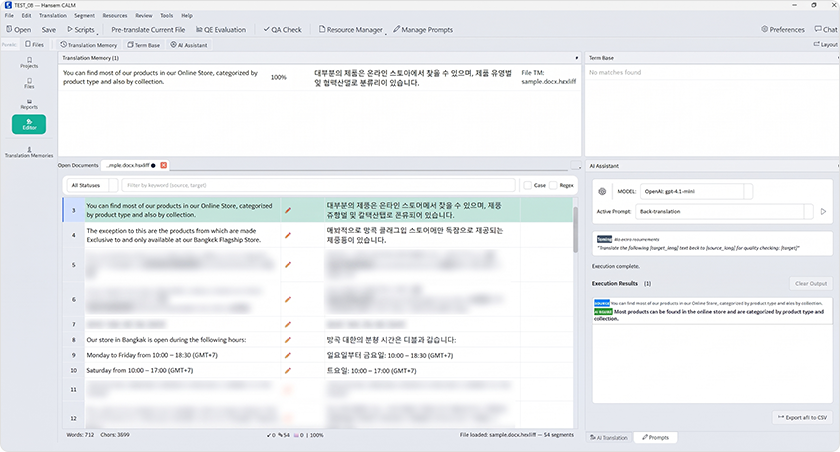
In LLM translation, output quality depends as much on the information the model receives as on the model itself. For every segment, CALM looks up the termbase entries detected in that sentence and the closest translation memory matches, then adds them to the prompt along with the source text. Because the model sees the approved terminology and past translations of similar sentences for every segment, the same term is far less likely to be translated differently across a document. Client style guides reach the model the same way.
Many clients do not have a glossary or style guide. When source documents or existing bilingual files are loaded into CALM, the LLM extracts term pairs and style rules and builds a glossary and style guide from them. These assets are reviewed and edited in the Resource Manager, then connected directly to the translation prompts.
The translation sequence is also designed around cost and consistency. When pre-translation runs, CALM first fills segments that meet the translation memory match threshold and sends only the remaining segments to the LLM. Verified translations are reused as they are, and AI spend goes only to new content. Match rates are calculated with text similarity and tag differences scored separately, so a sentence with identical text but different tags is not unfairly downgraded. Segments that are already confirmed or locked are never overwritten, whatever range pre-translation is run on.
LLMs Don’t Understand Tags
Real translation files carry formatting such as bold text, links, and variables as inline tags. An LLM treats these tags as part of the sentence, so it can easily reorder, drop, or alter them. A single broken tag can cause errors or broken formatting when the file is converted back to its original format. Before LLM translation can be used for real deliverables, this problem has to be solved.
CALM treats each tag as an atomic unit. In the editor, tags are displayed separately from regular text, and the tool blocks both partial deletion of a tag and broken tag markers introduced by pasting. Just before the final document is generated, a gate compares the number and order of tags in the source and target. When a mismatch is found, CALM can be set either to issue a warning or to stop generation.

File formats follow the same principle. Source documents such as Word, Excel, PowerPoint, InDesign, and HTML files are opened with their formatting intact, and once translation is complete, CALM generates the final document in the same format as the original. Bilingual files that clients or partners have worked on in Trados, memoQ, or Phrase are opened and returned with their metadata preserved, including lock status, segment status, and translation origin. Partners can work on the same files regardless of the CAT tool they use.
AI Translation Quality Evaluation Inside the Workflow
CALM includes Hansem QA, Hansem Global’s translation quality assurance tool. Rule-based QA, AI quality estimation (QE), and back-translation checks run inside the same project as the editor. The evaluation methods themselves are covered in “Translation Quality Evaluation in the AI Era: How Hansem QA Works,” so this section focuses on what changes when quality evaluation becomes part of the translation workflow.
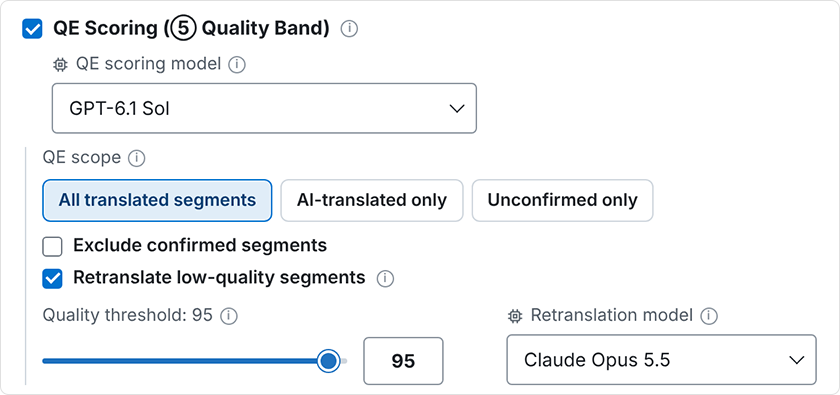
In CALM, quality estimation results do not end in a report. They determine what happens to each segment next. Segments that fall below the score threshold are retranslated with a designated model and then re-evaluated. Segments at or above the threshold can be confirmed in a single action from the report screen and locked if needed. As a result, reviewers spend their time on the segments that remain unconfirmed, in other words the ones the evaluation has flagged as risky. Selecting a row in the report jumps straight to that segment, so evaluation and editing flow together.
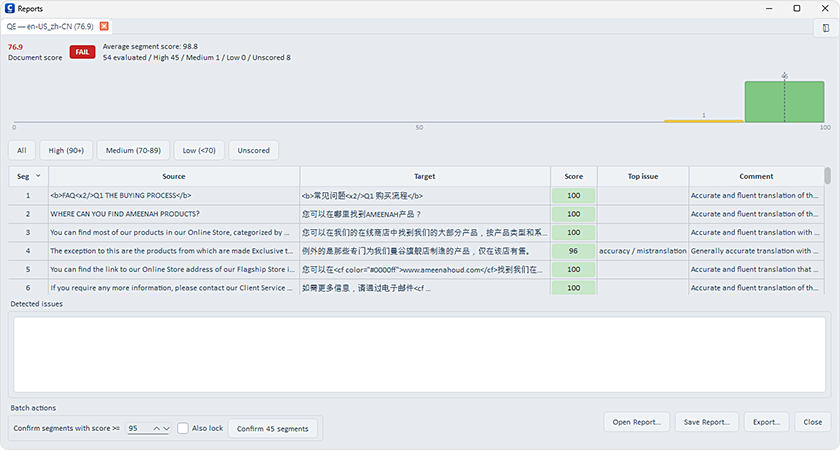
Another important point is that the translation model and the evaluation model can be set separately. A model grading its own translation is more likely to miss errors. In back-translation checks as well, the model that translates the text back and the model that judges meaning equivalence can be assigned separately.
One Run, Many Languages
In multilingual projects, the same tasks normally have to be repeated for every language and every file. CALM holds multiple target languages in a single project and splits source files into language-specific folders so the progress of each can be tracked. When creating a new project, users can also choose which tasks run automatically right after setup, such as pre-translation, quality evaluation, QA, and final document generation.
Users can also select files in several languages from an existing project and process them all at once. Analysis, pre-translation, quality evaluation, back-translation, QA, and final document generation run in a fixed sequence for every target language without opening the editor. A large project can be started in the evening and its reports reviewed the next morning.
For high-volume work, users can choose the LLM provider’s batch processing option. Requests are processed asynchronously instead of in real time, which cuts token costs by roughly half. Token usage and cost are logged for every task, so the choice of model and processing method for each project rests on actual numbers.
People Decide, and the Tool Applies Their Decisions Precisely
Even in an AI translation environment, people make the final call on difficult sentences. In CALM, translators can send a challenging segment to AI chat and ask for an explanation of its meaning, suggested improvements, alternative translations, or a review of terminology and tone. They can also send multiple segments at once to check consistency across the entire document.
The critical part is returning the refined result from the chat to exactly the right place. Rows may be added or deleted while the conversation is going on, so row numbers alone cannot guarantee the correct position. CALM’s SegLink finds the original segment using a key that combines the segment ID, a hash of the source text, and the file path. Before changes are applied, users pick only the items they want from a row-by-row preview, and locked segments or tag issues are flagged at this stage as well.
Keeping Translation Data In-House
CALM stores translation memories, termbases, and project files on in-house PCs and shared folders. Translation assets are not uploaded to an external cloud translation management system (TMS), and the API keys used for LLM calls are managed directly by Hansem Global.
For material that cannot leave the organization at all, users can choose a local model that runs on the PC itself. In that case, translation requests never go to an external LLM provider. For each project, the team chooses between the latest cloud models and a local model based on the nature of the content and its security requirements.
The Edge in LLM Translation Comes from Workflow Design
LLMs keep changing, and there is no guarantee that today’s best model will still be the best tomorrow. That is why Hansem Global has built its technology into the workflow rather than into any single model. Once the workflow can choose what information goes to the model, protect formatting, evaluate results to decide the next step, and apply human judgment precisely, every new model’s gains translate directly into translation quality. CALM brings that structure together in one environment and continues to evolve in response to the needs of production teams.