


In our first article, we asked why some manuals are produced in a locked room. The locked room — the secure workroom — exists because there are risks an NDA alone cannot contain: risks that live in the environment itself.
So what is that locked room actually made of? Does fitting a single lock turn an ordinary office into a secure workroom? It does not. What makes a locked room function as a locked room is not the lock. It is the sum of an environment in which every path that information could leak through has been closed in advance.
Part 2 is about what that environment is made of.
The short answer: a secure workroom rests on four pillars — space, network, equipment, and tools — that break down into eight concrete conditions. Each one closes a different path confidential information could otherwise travel, and together they form the foundation of real IP protection in localization. Here is how they fit together.
1. Space — It Must Be Physically Separated
A secure workroom begins with the separation of space. A partition set up inside a shared office is not a secure workroom. The glance from a nearby desk, the foot traffic of people passing by, a computer that shares the same network line as general office work — each of these is a path information can travel.
A true secure workroom is physically separated from the general office. It has its own entrance, no sightlines to the outside from within, and sits off the path where an ordinary employee might wander in. Hansem Global operates a secure workroom inside its headquarters that is completely separated from general work areas, and for some clients it runs multiple secure rooms within a single building at the same time.
Access must be controlled as well. Only pre-approved people — and only those directly involved in the project — may enter. Entry is controlled by ID badge, and access logs are retained. Defining exactly who is allowed in is the first condition of a secure workroom.
2. Network — It Must Be Air-Gapped
The computers inside a secure workroom are not connected to the internet. This does not mean “going easy on internet use.” It means they are physically and logically isolated from any external network — air-gapped.
Why does this matter so much? Because most of the paths information leaks through are network paths. A deliberate attempt to send files outside and an accidental, unintended leak alike — an email attachment, a cloud sync, a messenger transfer, a social media upload — all travel through the network. If that path itself is closed, there is no way out.
An air-gapped environment is, admittedly, inconvenient to work in. You cannot search the web, cloud collaboration tools are off the table, and you cannot instantly check an external reference. So some companies choose a compromise: leave the internet on, but monitor it aggressively.
That compromise does not control the risk. Monitoring is only a way to trace an incident after it has already happened. In an environment built around handling information, “after it happens” is too late. Information that has leaked once does not come back. That is why a real secure workroom does not manage the internet — it blocks it.
“Monitoring traces an incident after it happens. What a secure workroom does is remove the path through which the incident could happen at all.”
3. Equipment — Every Exit Path Must Be Blocked
Even on an air-gapped computer, security is not complete if a path remains for carrying data out.
So the computers in a secure workroom have those exit paths closed off. USB ports are physically sealed. External hard drives, memory cards, and portable storage cannot be used. Optical media such as CDs and DVDs are no different.
The camera lens of any phone a worker is permitted to bring in is covered with a tamper-evident security sticker. One of the most common leak paths is simply photographing the screen with a phone. You cannot block the human eye, but you can block the human camera.
And high-resolution CCTV records the interior and the entrance around the clock. This CCTV is a tool for deterrence more than prevention. Even someone inclined to attempt a deliberate leak tends to stop once they know their actions are being recorded twenty-four hours a day.
4. Tools and Software — Work Still Has to Get Done
By this point, a reader may have one question. In an environment where every path is blocked, how is any work actually done?
This is the hardest part of a secure workroom. Blocking is not difficult. What is genuinely difficult is making deliverables come out of a blocked environment.
Many of the tools used in manual production and localization assume an internet connection: mainstream design software, cloud-based translation memory services, collaborative document editors, font and icon libraries, license-activation servers. None of these work as-is inside a secure workroom.
So a secure workroom has to be provisioned with its own tools. Software with separate, workroom-dedicated licenses; in-house tools built to run without the internet; pre-loaded libraries of fonts, icons, and reference material; an internal collaboration system that never touches the cloud — these have to be in place in advance.
For a language services provider, this is what a secure translation environment actually requires in practice: not just a closed door, but a complete offline toolchain that keeps deliverables moving without ever exposing a client’s source files.
And these tools are not a set-it-and-forget-it matter. Software versions get updated, licenses have to be renewed, operating systems need security patches. Carrying out all of those updates safely without an external network requires a separate, verified procedure.
A secure workroom is not simply a room with the internet switched off. It has to be physically separated from general work areas, open only to approved personnel, with external networks, storage media, and recording devices all controlled. Only when CCTV records, dedicated tools, and a regular security-update procedure are added on top does it become a secure environment where real work can actually happen.
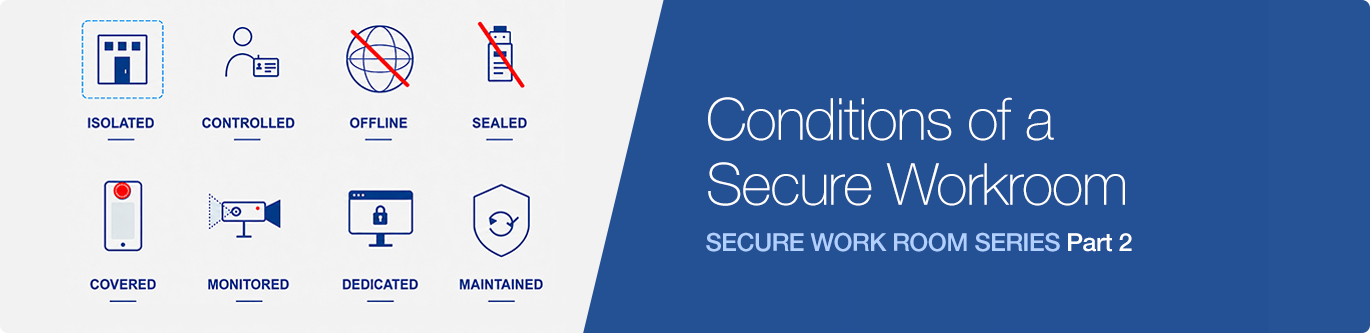
The eight core conditions of a secure workroom are as follows:
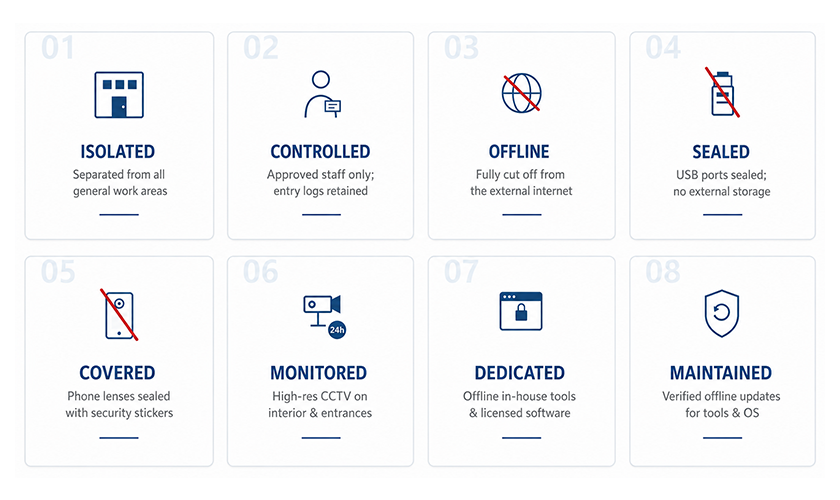
1. Isolated space — placed in a dedicated area physically separated from the general work space.
2. Controlled access — only pre-approved, project-relevant personnel enter by ID badge, and access logs are retained.
3. Offline (air-gapped) network — internal computers are physically and logically isolated from the external internet.
4. Sealed devices — USB ports are physically sealed, and external drives, memory cards, and optical media are disallowed.
5. Covered cameras — the camera lens of any phone brought in is covered with a tamper-evident security sticker.
6. Monitored space — high-resolution CCTV records the interior and entrance 24/7 to deter leak attempts.
7. Dedicated tools — offline-capable in-house tools, dedicated licenses, and pre-loaded font and reference libraries.
8. Maintained securely — a verified procedure renews software, operating systems, and licenses without an external network.
Having One Is Not the Same as Operating One
Every condition listed so far can be acquired with capital. Separating space, cutting the network, sealing USB ports, installing CCTV — in the end, these are matters of cost.
But with a secure workroom, there is a large distance between having one and operating one. You realize it soon after operation begins: which tools to pre-load and how, so work does not grind to a halt in an internet-free environment; how to renew a license when it expires; what procedure to follow to bring in a new OS version; how to deliver work safely to an external reviewer. This operational know-how is not written in any manual.
That is why the real value of a secure workroom comes from operating hours, not from a spec sheet. A company that has operated one for a year and a company that has operated one for ten will give different answers, even if their secure workrooms have identical specifications.
That is why Hansem Global calls its secure workroom an “asset” rather than “equipment.”
Coming Next
So far, we have looked at what a secure workroom is made of: space, network, equipment, tools.
But one thing is still missing. Even after all of this infrastructure is in place, the single most important variable in a secure workroom’s safety remains. The next article covers what matters more than the physical environment — security awareness, the real infrastructure.
The real value of a secure workroom comes from operating hours, not from a spec sheet.
Hansem Global Secure Workroom Series · Part 2
Frequently Asked Questions
What is a secure workroom?
A secure workroom is a physically separated, access-controlled, air-gapped production environment where confidential manuals are written, designed, and localized. It is defined not by a single lock but by the sum of eight conditions: isolated space, controlled access, an offline network, sealed devices, covered cameras, CCTV monitoring, dedicated tools, and a verified maintenance procedure.
Why isn’t monitoring internet use enough to protect confidential content?
Monitoring only traces an incident after it has already happened, and information that has leaked once cannot be recalled. A genuine secure translation environment removes the leak path entirely by air-gapping the network, rather than watching traffic on a live internet connection.
How does a secure workroom support IP protection in localization?
Manual production and localization routinely touch a client’s unreleased products, specifications, and source files. A secure translation environment keeps that material inside a controlled space — blocking removable media, screen photography, and external networks — so IP protection in localization is enforced by the environment itself, not by an NDA alone.
📌 SERIES GUIDE
This is Part 2 of Hansem Global’s Secure Workroom Series. The series runs as follows:
Part 1 · Why Some Manuals Are Made Behind Locked Doors
Part 2 · What a Secure Work Room Is Made Of (Environment and Infrastructure) (current article)
Part 3 · A Lock Doesn’t Lock Itself (Security Awareness, the Real Infrastructure)
Part 4 · Writing Manuals in a Room With No Internet (A Day in the Life of a Technical Writer)
Part 5 · Managing 50 Languages Inside a Locked Room (A Day in the Life of a Localization PM)
Part 6 · Making Marketing Content in a Sealed Room With No Internet (A Day in the Life of a Retail Graphic Designer)
Part 7 · 14 Years, Zero Breaches: Why It Was Possible.